Written by: Nuno Leiria, Founder & CEO @ Nilo
Key Takeaways
- Roblox Studio’s steep learning curve, installation requirements, and Lua scripting create major friction when you move from playing to creating.
- Free browser-based 3D game creation platforms remove many of these barriers by combining AI-assisted modeling, natural language prompts, and real-time multiplayer without downloads or coding.
- When you compare tools, focus on AI asset generation with refinement tools, natural language scripting alternatives, real-time physics-based world building, automatic performance controls, and export options that fit how you publish.
- Platforms like Nilo stand out by offering multi-provider AI models, voice and text code generation, real-time multiplayer collaboration, automatic LOD controls, and direct Roblox export compatibility.
- Start building without the friction by joining Nilo’s open beta for free.
The Problem: Friction When You Try To Start Building
Roblox Studio is a professional-grade desktop app that expects a lot from you. It needs installation, a capable computer, and Lua scripting if you want anything interactive. For most aspiring builders like you, scripting becomes the wall. You have a game idea, strong spatial instincts from years of playing, and zero interest in spending months learning a programming language before you can test a single mechanic.
Tool fragmentation makes everything feel heavier. A typical workflow looks like this: generate an asset in Meshy, clean it in Blender, import it into Roblox Studio, fix the rig, then debug the export. Each handoff breaks your momentum. Each new tool adds another learning curve. By the time you wrestle a single character into your world, your original excitement has faded.
Scripting anxiety hits builders at every stage. You try to learn Lua, get lost in documentation, look for a scripter to partner with, wait, lose momentum, then drop the project. This pattern does not mean you lack skill. It shows that the tools were not designed around how you actually want to create.
The Solution: Free Browser-Based 3D Game Creation Platforms
The friction points above, like installation, scripting anxiety, and tool hopping, are not fixed parts of game creation. A new category of tools is growing that removes many of these barriers. Free browser-based 3D game creation platforms combine AI-assisted modeling, natural language prompts where you talk or type what you want, and real-time multiplayer, all inside your browser without downloads or coding.
Three technology shifts made this possible. Generative AI can now produce 3D models and working code from text descriptions. Modern browsers with WebAssembly and WebGPU bring game-engine performance to the web. A generation of aspiring builders like you grew up in 3D worlds and now want to create, not just play.
Tools in this category differ a lot in depth, performance, and style. When you understand six core capabilities and the trade-offs behind each one, you can pick the platform that fits how you like to build.
Capability 1: 3D Asset Generation and Cleanup
The challenge: Building a custom 3D model from scratch in Blender can take hours. AI generation speeds this up, but raw AI models often arrive with messy geometry, weird symmetry, or textures that break once you see them in a real game.
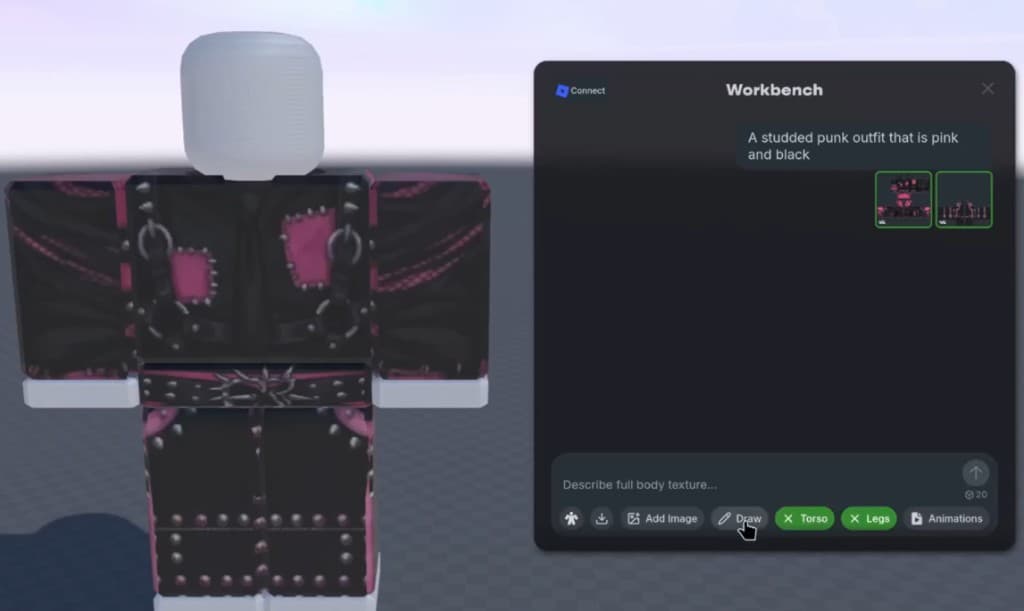
What to look for: A platform that connects to several AI model providers through one simple interface gives you more creative range. Nilo stands out here with a model-agnostic layer that connects to providers like Meshy, Tripo, Nano Banana, Cartwheel, and others. You can switch between them for different styles, quality levels, and speeds without leaving your browser. Nilo also supports a sketch-to-3D flow where you draw in 2D, refine with AI, then drag the result straight into your world.

Trade-offs: Polygon limits and texture resolution differ across tools. Platforms tuned for Roblox export, which caps assets at roughly 10K–20K polygons, need a real-time level of detail system that automatically reduces polygon counts to match performance limits. Some browser tools skip this, which pushes cleanup back to you. PlayCanvas delivers strong 3D rendering in the browser but focuses more on professional developers than on aspiring builders who are just starting.
Capability 2: Natural-Language Logic Instead of Scripting Walls
The challenge: Scripting blocks many builders from shipping their ideas. You might know exactly how a mechanic should feel but have no clear way to turn that idea into working logic.
What to look for: Natural language code editors let you describe behavior in plain language while the platform writes the logic. Nilo’s built-in editor accepts text or voice prompts and shows the results live in your 3D world. You can also open the generated code, see variables like “speed = 2,” and change them to “speed = 20.” This teaches real programming concepts while you build instead of forcing you to study first.
Trade-offs: Rosebud AI leans hard into AI-assisted code generation and runs in the browser, but it does not include a deep custom 3D engine. Unity’s new browser editor, Unity Studio, adds no-code ideas on top of a powerful engine, yet the underlying complexity of Unity still shows up as you go deeper.
Capability 3: Interactive World Building and Scene Assembly
The challenge: Making a world feel alive means more than dropping objects on a blank grid. You need tools that feel playful and interactive from the first click, not a silent scene that only moves after a long setup.
What to look for: Real-time physics should just work so objects move and react without extra wiring. Nilo’s world-building tools include a radial menu for quick object creation, an inspector panel for detailed tweaks, and simple controls for sky, ground, and color. Everything reacts by default, so you are not manually wiring collisions or basic animations. As one builder noted in Nilo’s February 2026 survey, “It helps me physically visualize any images I may have drawn and helps make my ideas actually come to life.”

Trade-offs: Prompt-to-game tools like Spawn and Bitmagic can create full environments from a single text prompt. They often give you less direct control once the scene appears. If you like to build spatially by placing, adjusting, and iterating, a responsive game engine matters more than raw generation speed.
Capability 4: Performance Limits and Automatic Optimization
The challenge: Roblox enforces strict performance rules. Assets that go past polygon limits can lag, fail checks, or get blocked. Handling this by hand takes time and drains your energy.
What to look for: An automatic LOD system that adjusts polygon counts as you work saves hours. Nilo’s real-time LOD slider simplifies meshes for you and keeps assets within the polygon caps mentioned earlier, so you avoid manual retopology. Another builder in the same survey described the difference: “Picture yourself, frustrated because you spent the last 5 hours 3D modeling a shipping container. All I have to do is open Nilo and do it in 20 seconds.”

Trade-offs: Tools without built-in optimization send you back to Blender for cleanup, manual polygon reduction, and repeated export tests. Sloyd focuses on AI 3D asset generation but does not cover the full optimization and export flow that Roblox projects usually need.
Capability 5: Real-Time Collaboration and Sharing
The challenge: Traditional game creation feels lonely. You build alone, send files, wait for comments, and repeat. That rhythm does not match the social games that inspired you to build in the first place.
What to look for: Real-time multiplayer creation lets you share a link and build together instantly. Nilo supports this on desktop and mobile. You share a URL, friends join your world, and everyone builds and plays together in real time. Published worlds show up in a scrollable feed similar to Roblox’s experience list. Nilo’s growing Discord community reflects how central social creation is to the platform.

Trade-offs: PlayCanvas supports collaboration but mainly targets professional teams. Many prompt-to-game tools in this space, including Oasiz and Starstuff, focus on single-player creation without real-time co-building.
Capability 6: Export, Roblox Studio, and Other Engines
The challenge: A browser tool that traps your work inside its own ecosystem limits your options. You might want to publish on Roblox, continue polishing in Blender, or move into Unity later.
What to look for: Look for export in standard 3D formats like FBX, OBJ, STL, or glTF that work across major platforms. Nilo exports optimized assets directly to Roblox Studio and other platforms without extra cleanup. It works with Unity, Unreal Engine, Blender, and VRChat. A third survey respondent explained, “I like how it feels like a good game engine rather than a vibe coding tool, with easy building and a good focus on being able to export and import content.”
Trade-offs: Lemonade.gg connects into Roblox Studio as an AI assistant but depends on Roblox Studio as the main editor. It does not act as a full standalone platform. Tools that only export to their own formats limit where your creations can go next.
How To Compare Browser-Based 3D Tools Yourself
When you compare browser-based 3D creation tools, start with polygon caps and whether the tool handles optimization automatically. This decides if your assets will work in Roblox without extra cleanup. Next, test multiplayer latency on mobile, because real-time co-building should feel responsive instead of laggy. Finally, check export quality in FBX or glTF, and confirm that rigs and animations survive export so your work is not locked to one platform.
Three simple scenarios can guide your choice.
First-time builder: If you have never used a 3D tool, pick a platform with no installation, a natural language interface, and physics that work right away. The learning curve should feel like playing a game, not running heavy software.
Building with friends: If you want to create a world together, focus on real-time multiplayer creation, link-based sharing, and solid mobile support so everyone can join from whatever device they have.
Quick-prototyping creator: If you care about testing ideas fast, look for AI asset generation, a natural language code editor, and one-click publishing. That mix lets you move from concept to a shareable world without getting stuck on any single step.
Quick Comparison of Popular Tools
| Tool | Browser Access | AI Asset Generation | Real-Time Multiplayer | Roblox Export | No-Code Logic |
|---|---|---|---|---|---|
| Nilo | Yes | Yes (multi-provider) | Yes | Yes (LOD-optimized) | Yes (natural language) |
| Unity (Unity Studio) | Partial (new browser editor) | Limited | Requires setup | Via FBX/glTF | Limited |
| PlayCanvas | Yes | No | Requires scripting | Via glTF | No |
| Rosebud AI | Yes | Limited | No | No | Yes (AI code gen) |
| Sloyd | Yes | Yes (model gen only) | No | Via FBX/glTF | No |
Frequently Asked Questions
Does a true browser version of Roblox Studio exist?
No. As of mid-2026, Roblox Studio is still a desktop app that you install on Windows or macOS. There is no official browser version. Browser-based platforms like Nilo fill this gap by letting you generate, clean up, rig, and export Roblox-ready assets entirely in your browser. You can then send them into Roblox Studio with a single click, without opening Blender or managing retopology yourself.
What skills do you need to use these tools?
Skill requirements change a lot from tool to tool. Professional platforms like Roblox Studio, Unity, and Blender expect scripting knowledge, comfort with 3D modeling, and a big time investment before you see interactive results. Browser-based AI-native platforms try to lower that barrier. Nilo, for example, accepts text prompts, sketches, and images as inputs, so if you can describe what you want, you can start building. The interface also introduces ideas like rigging, polygons, and mesh topology while you work, so you learn by doing instead of studying first.
How do exports work with Roblox Studio?
Most browser-based tools export to standard 3D formats such as FBX, OBJ, STL, or glTF that Roblox Studio can import. The key question is whether the exported file respects Roblox’s performance rules. Assets need to stay within the polygon limit discussed in Capability 4, and textures usually work best at 1024×1024 or smaller. Tools without built-in optimization send this cleanup back to you, often through Blender. Nilo’s LOD system handles polygon reduction before export, so the file you download already fits Roblox. Rigged and animated models keep their rigs during export and work with Roblox Studio, Unity, Unreal Engine, VRChat, and Blender.
Conclusion
Free browser-based 3D game creation platforms now give aspiring builders like you a real path from playing to creating. You can avoid heavy installs, steep scripting walls, and long chains of separate tools. The right platform depends on where you are in your journey, what you want to build, and how much technical setup you feel like handling.
If you are starting out and want a browser experience that combines AI asset generation, natural language logic, real-time multiplayer, and Roblox-friendly export, Nilo stands out as a complete option in this category today. It is supported by the growing community mentioned earlier and by survey results where most builders said they would recommend it to a friend.
Whatever tool you choose, the barrier to building your first 3D world has never been lower. Your creativity sets the ceiling, not your current skillset.
Join Nilo’s open beta and start creating your first 3D world for free.