Content

Written by: Nuno Leiria, Founder & CEO @ Nilo

Key Takeaways

  • Traditional Roblox item creation uses several tools and manual cleanup in Blender, which slows down your creative flow.
  • Nilo is a browser-based platform that lets you generate, clean up, rig, and export Roblox-friendly assets without coding or Blender.
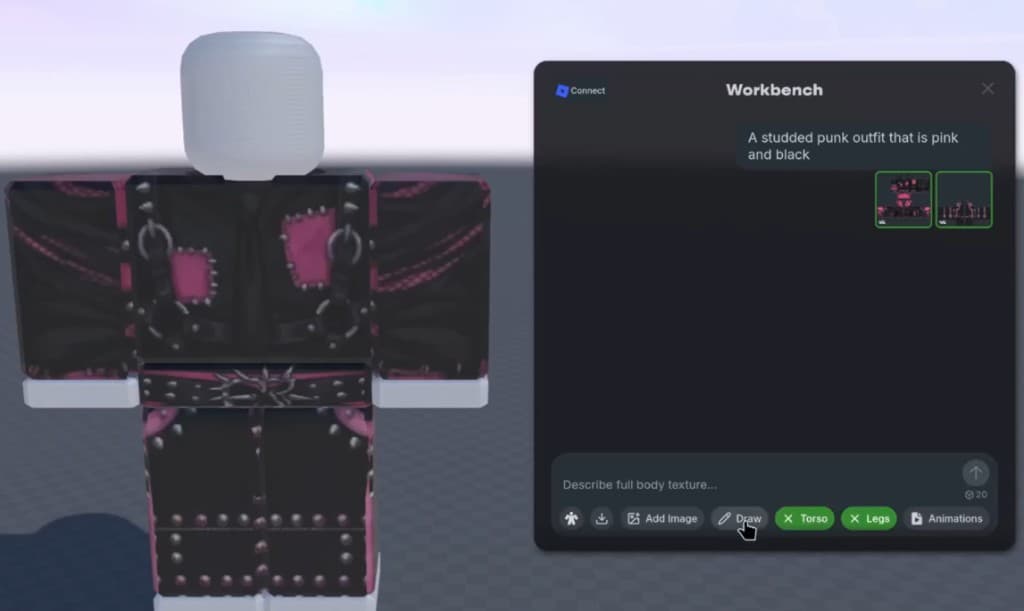
  • You capture ideas with text, sketches, or reference images, then turn them into clothing or accessories using AI-powered templates.
  • One-click retopology, LOD controls, rigging, and animation keep models within Roblox polygon limits and ready for Studio import.
  • Join Nilo’s open beta to start making Roblox items without coding today.

Quick Start: 4 Steps to Your First Roblox Item

  1. Capture your idea, then type a text prompt, upload a sketch, or drop in a reference image inside Nilo.
  2. Generate your item using clothing templates for wearables or AI generation for accessories, hats, and props.
  3. Optimize and rig with one click by using the LOD (level of detail) slider to match Roblox’s polygon limits, then rig and animate instantly.
  4. Export and import into Roblox Studio by downloading an FBX or glTF file and importing it directly.

Step 1: Capture Your Idea With Text, Sketch, or Image

You can start without any 3D modeling background. Inside Nilo, you describe what you want in plain text, like “a futuristic visor with neon trim,” and the platform turns that description into a 3D model. If you prefer drawing, Nilo’s sketch-to-3D flow lets you draw in 2D, refine the result with AI by adjusting colors, removing backgrounds, or changing style, and then drag it straight into your 3D world.

You can also upload a reference image such as a screenshot or photo, and Nilo uses it as a starting point for your model. All three input methods run in the browser on desktop or mobile with no installation. Once you have your idea captured in Nilo, you are ready to turn it into a finished 3D item.

Assets generated through Nilo, a browser-based 3D creation platform built for Roblox creators and game developers

Step 2: Turn Ideas Into Clothing or Accessories

Nilo lets you generate 3D characters, weapons, and detailed props in seconds from sketches or prompts. For clothing like jackets, shirts, and pants, Nilo gives you templates that hide the 3D complexity. You focus on the design while the platform handles the geometry and fit. For accessories like hats, wings, and shoulder pieces, the AI tools create shaped, textured models that are ready for cleanup and rigging.

Nilo’s AI layer pulls from multiple model providers, including Meshy, Tripo, and Cartwheel, behind a single interface. You do not need to pick which model runs for each asset. You just describe what you want and get a result you can tweak.

Assets and world generated through Nilo, a browser-based 3D creation platform built for Roblox creators and game developers

Step 3: Clean Topology, One-Click Rigging, and Fast Animation

Retopology means cleaning up a 3D mesh so it bends correctly and stays within polygon limits. In a traditional workflow, this step alone can take 30 minutes or more per asset inside Blender. Nilo handles this cleanup automatically in real time while you work.

The LOD (level of detail) slider lets you adjust polygon count on the fly until your model fits Roblox’s typical 10,000 to 20,000 triangle range. Once the mesh looks clean, one click rigs the model so it gets a skeleton and can move and animate. You then type what you want the character to do, generate an animation, and see it play without extra setup.

Obby course generated through Nilo, a browser-based 3D creation platform built for Roblox creators and game developers

This speed difference is exactly what builders notice first. As one builder put it in Nilo’s February 2026 survey: “I do not have to spend hours on 3D modeling the simplest things. Now I can use Nilo and do it in 15 seconds.”

Step 4: Export and Bring Your Item Into Roblox Studio

When your item looks ready, you click Export and download your file in FBX or glTF format, which both work well with Roblox Studio. Nilo keeps polygon counts in a Roblox-friendly range so models load in Studio without extra cleanup. You get clean topology and no strange artifacts, so you avoid manual mesh fixing, import errors from mismatched formats, and pivot point corrections.

After export, you import the file into Roblox Studio, and your hat, accessory, or clothing item is ready for your game or for a Marketplace submission. Join Nilo’s open beta and try building and playing for free, making Roblox items without coding in your browser right now.

Nilo vs. Customuse and UGCraft: Fixing the Broken Pipeline

Tools like Customuse and UGCraft let you design clothing and accessories with visual editors, but they usually stop at the design stage. After you create an asset in those tools, you often still move the file into Blender to fix topology, reduce polygon counts by hand to meet Roblox’s limits, and then import into Roblox Studio. Along the way, you can hit rig errors, lost materials, or export issues that break your flow.

Nilo brings every stage into one place, including generation, retopology, LOD controls, rigging, animation, and export. You stay in a single browser tab instead of juggling several apps. Where Customuse and UGCraft focus on design templates, Nilo covers the full asset workflow from idea to a file that works smoothly in Roblox Studio, with polygon limits handled for you.

Characters and world generated through Nilo, a browser-based 3D creation platform built for Roblox creators and game developers

The practical difference feels big. A workflow that used to involve three or four tools and more than 30 minutes of cleanup can now happen in one browser tab, often in under a minute.

How You Can Make Your Own Roblox Items

You can make your own Roblox items without knowing how to code or model in 3D. Roblox supports creator-made items both for personal use inside your own games and for public sale on the Roblox Marketplace through the UGC (User-Generated Content) program. Modern browser-based platforms like Nilo let you move from an idea to a finished item without installing heavy software or learning Blender.

If you can describe what you want in words, a sketch, or a reference image, you can create a Roblox item. The technical barriers that used to block aspiring builders or already builders like you, such as mesh cleanup, polygon limits, and rigging, now happen automatically in the background. Your creativity sets the ceiling, not your current tool skills.

Personal-Use Items vs. Marketplace Publishing on Roblox

You can follow two main paths for your Roblox creations. Personal-use items are assets you create and use inside your own Roblox games with no approval process. You export from Nilo, import into Roblox Studio, and then use the item however you like in your world.

Publishing to the Roblox Marketplace through the UGC program works differently. Roblox asks creators to apply for UGC access, and you pay upload fees when you list items for sale. Items go through moderation review before they appear publicly. Any models, skins, or UGC items you create in Nilo belong to you, so you can publish and monetize them as you choose. For the latest fee structure and eligibility rules, check the official Roblox Creator documentation, since Roblox updates those details over time.

Creating Roblox Items on Mobile Devices

You can make Roblox items on mobile using Nilo in a mobile browser, with no app download or special setup. Open nilo.io on your phone or tablet, sign in, and you get the full creation flow, including text prompts, sketch input, LOD controls, and export. The browser-based setup means it runs on any device with a modern browser, including desktops, Chromebooks, and phones.

This flexibility matters because most traditional 3D tools, such as Blender and Roblox Studio, run only on desktop systems. Nilo removes that hardware requirement so you can create wherever you are.

Frequently Asked Questions

How long does it take to make a Roblox item in Nilo?

Asset generation usually takes from a few seconds to a couple of minutes, depending on complexity. As mentioned earlier, some builders have finished simple 3D items in about 15 seconds. The full flow from prompt to Roblox-friendly export stays much faster than traditional pipelines that rely on Blender cleanup.

Is Nilo free to use?

Yes. Nilo’s free tier includes 1,000 Nilo Bits per month, which are credits that power AI generation, rigging, and export. Many core building features do not use Bits at all. Higher tiers give you more Bits and access to the newest generation models if you create at higher volume.

What file formats does Nilo export for Roblox?

Nilo exports FBX, glTF (also called .glb), OBJ, and STL. For Roblox Studio, FBX and glTF usually work best and import cleanly without extra conversion steps.

Do I need Roblox Studio to use my Nilo items?

You need Roblox Studio when you want to bring items into Roblox games or submit them to the Marketplace. Nilo covers everything before that step, including generation, cleanup, rigging, and export. Once you have your file, you import it into Roblox Studio the same way you would import any standard 3D asset. Nilo is not a Roblox plugin but a standalone browser platform that exports to Roblox-compatible formats.

Can I make hats and accessories, not just clothing?

Yes. Nilo’s AI tools work for hats, shoulder accessories, back accessories, face accessories, props, weapons, and full clothing items. You can generate from a text description, a sketch, or a reference image, and the output respects Roblox’s polygon and texture requirements automatically.

Start Making Roblox Items Without Coding

The old way used a fragmented workflow with an AI tool, then Blender, then Roblox Studio. Nilo brings the whole process into one browser tab so you describe your idea, generate the item, clean it up and rig it with one click, and export a file that works smoothly in Roblox Studio.

With 93% of builders in Nilo’s February 2026 survey saying they would recommend the platform to a friend, and a growing community of more than 9,000 builders on Discord, you join a creative group that understands what you are trying to make. Join Nilo’s open beta and start building and playing for free, making your first Roblox item without coding today.